
Stateful Widgets
1 App Development
1.8 Incrementing Likes Using a Stateful Widget
The correct way to show the likes count in the app is to use a Stateful widget. From Visual Studio, click on StatelessWidget in class Home extends StatelessWidget {, then click on the action yellow lamp that shows to the left, and choose Convert to Stateful Widget.
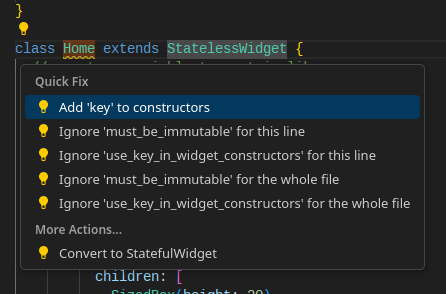
You get the following code.
    import 'package:flutter/material.dart';

    void main() {
      runApp(MaterialApp(
        home: Home(),
      ));
    }

    // stateless widget becomes stateful widget
    class Home extends StatefulWidget {
      @override
      // a state class _HomeState for Home is created
      State<Home> createState() => _HomeState();
    }

    class _HomeState extends State<Home> {
      // create a variable to contain likes
      int likes = 0;

      Widget build(BuildContext context) {
        return Scaffold(
            appBar: AppBar(
              title: Text('My Portfolio'),
              backgroundColor: Colors.red,
              centerTitle: true,
            ),
            body: Column(
              children: [
                SizedBox(height: 20),
                Container(
                  decoration: BoxDecoration(
                      border: Border.all(color: Colors.black),
                      color: Colors.grey[100]),
                  padding: EdgeInsets.all(10),
                  margin: EdgeInsets.only(left: 10, right: 10),
                  child: Row(
                    mainAxisAlignment: MainAxisAlignment.spaceEvenly,
                    children: [
                      Image.asset(
                        'lib/assets/images/salah.jpeg',
                        width: 100,
                      ),
                      Column(
                        crossAxisAlignment: CrossAxisAlignment.start,
                        children: [
                          Text('Name'),
                          Text(
                            'Salaheddine Al-Ayyoubi',
                            style: TextStyle(fontWeight: FontWeight.bold),
                          ),
                        ],
                      ),
                      Column(
                        crossAxisAlignment: CrossAxisAlignment.start,
                        children: [
                          Text('DoB'),
                          Text(
                            '1138',
                            style: TextStyle(fontWeight: FontWeight.bold),
                          ),
                        ],
                      ),
                    ],
                  ),
                ),
                SizedBox(height: 20),
                Container(
                    padding: EdgeInsets.only(left: 10, right: 10),
                  child: Row(
                    mainAxisAlignment: MainAxisAlignment.spaceBetween,
                    children: [
                      // display the number of likes
                      Text('Likes: $likes'),
                      ElevatedButton(
                        // increase the number of likes each time the
                        // button is pressed
                        onPressed: () {likes++;},
                        child: Text('Like'),
                      )
                    ],
                  ),
                ),
              ],
            ));
      }
    }
If you restart the app and press the button, the likes counter will not change. The reason is that we need to use a special function setState() to assert the state changes. The function is added as shown in the following code.
    import 'package:flutter/material.dart';

    void main() {
      runApp(MaterialApp(
        home: Home(),
      ));
    }

    // stateless widget becomes stateful widget
    class Home extends StatefulWidget {
      @override
      // a state class _HomeState for Home is created
      State<Home> createState() => _HomeState();
    }

    class _HomeState extends State<Home> {
      // create a variable to contain likes
      int likes = 0;

      Widget build(BuildContext context) {
        return Scaffold(
            appBar: AppBar(
              title: Text('My Portfolio'),
              backgroundColor: Colors.red,
              centerTitle: true,
            ),
            body: Column(
              children: [
                SizedBox(height: 20),
                Container(
                  decoration: BoxDecoration(
                      border: Border.all(color: Colors.black),
                      color: Colors.grey[100]),
                  padding: EdgeInsets.all(10),
                  margin: EdgeInsets.only(left: 10, right: 10),
                  child: Row(
                    mainAxisAlignment: MainAxisAlignment.spaceEvenly,
                    children: [
                      Image.asset(
                        'lib/assets/images/salah.jpeg',
                        width: 100,
                      ),
                      Column(
                        crossAxisAlignment: CrossAxisAlignment.start,
                        children: [
                          Text('Name'),
                          Text(
                            'Salaheddine Al-Ayyoubi',
                            style: TextStyle(fontWeight: FontWeight.bold),
                          ),
                        ],
                      ),
                      Column(
                        crossAxisAlignment: CrossAxisAlignment.start,
                        children: [
                          Text('DoB'),
                          Text(
                            '1138',
                            style: TextStyle(fontWeight: FontWeight.bold),
                          ),
                        ],
                      ),
                    ],
                  ),
                ),
                SizedBox(height: 20),
                Container(
                  padding: EdgeInsets.only(left: 10, right: 10),
                  child: Row(
                    mainAxisAlignment: MainAxisAlignment.spaceBetween,
                    children: [
                      // display the number of likes
                      Text('Likes: $likes'),
                      ElevatedButton(
                        // increase the number of likes each time the
                        // button is pressed
                        onPressed: () {
                          setState((){
                            likes++;}
                            );
                        },
                        child: Text('Like'),
                      )
                    ],
                  ),
                ),
              ],
            ));
      }
    }
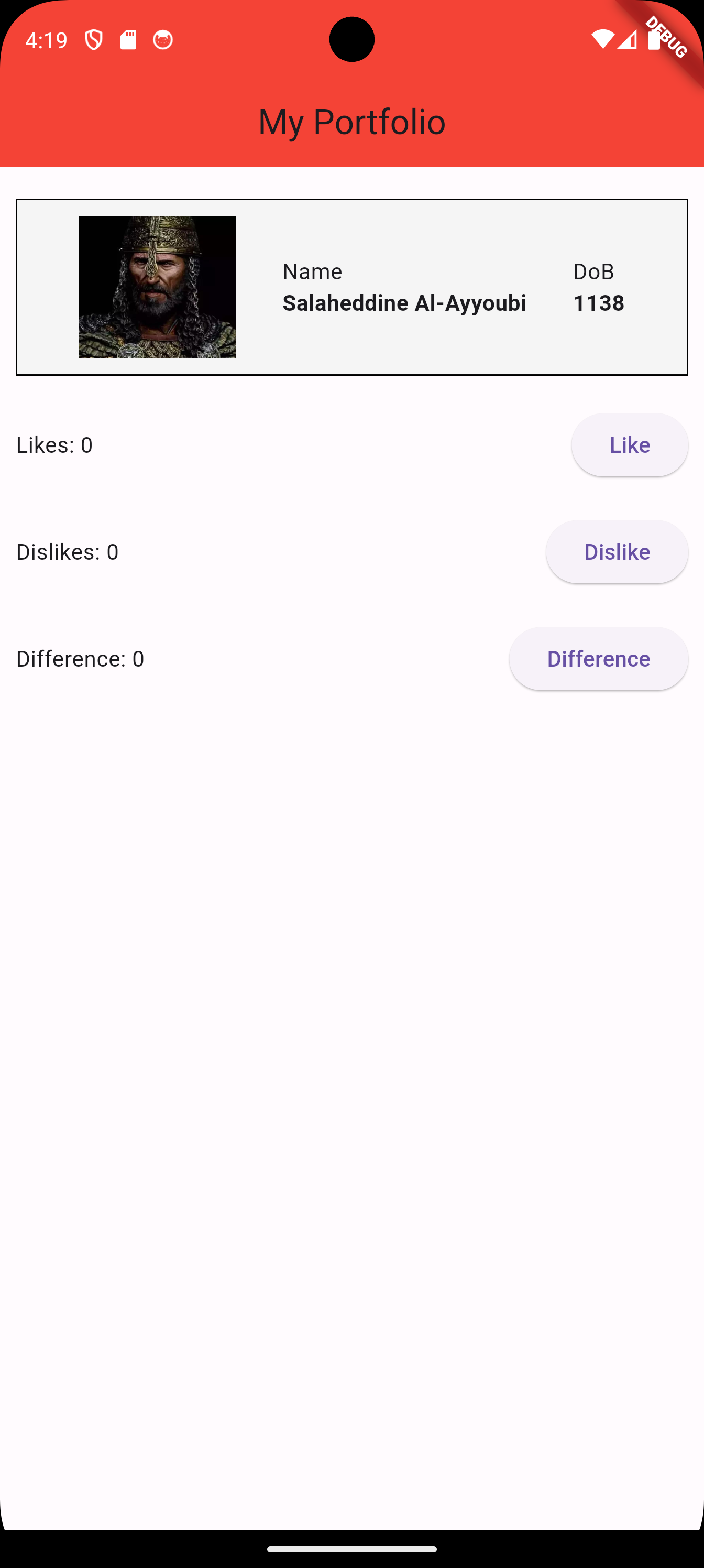
In order to understand the work of setState(), we will add two dummy buttons, one for dislikes, and for counting the difference between likes and dislikes. The variables likesdifference are updated using setState(), and the variable dislikes is updated without using setState().
    import 'package:flutter/material.dart';

    void main() {
      runApp(MaterialApp(
        home: Home(),
      ));
    }

    // stateless widget becomes stateful widget
    class Home extends StatefulWidget {
      @override
      // a state class _HomeState for Home is created
      State<Home> createState() => _HomeState();
    }

    class _HomeState extends State<Home> {
      // create a variable to contain likes
      int likes = 0;
      int dislikes = 0;
      int difference = 0;

      Widget build(BuildContext context) {
        return Scaffold(
            appBar: AppBar(
              title: Text('My Portfolio'),
              backgroundColor: Colors.red,
              centerTitle: true,
            ),
            body: Column(
              children: [
                SizedBox(height: 20),
                Container(
                  decoration: BoxDecoration(
                      border: Border.all(color: Colors.black),
                      color: Colors.grey[100]),
                  padding: EdgeInsets.all(10),
                  margin: EdgeInsets.only(left: 10, right: 10),
                  child: Row(
                    mainAxisAlignment: MainAxisAlignment.spaceEvenly,
                    children: [
                      Image.asset(
                        'lib/assets/images/salah.jpeg',
                        width: 100,
                      ),
                      Column(
                        crossAxisAlignment: CrossAxisAlignment.start,
                        children: [
                          Text('Name'),
                          Text(
                            'Salaheddine Al-Ayyoubi',
                            style: TextStyle(fontWeight: FontWeight.bold),
                          ),
                        ],
                      ),
                      Column(
                        crossAxisAlignment: CrossAxisAlignment.start,
                        children: [
                          Text('DoB'),
                          Text(
                            '1138',
                            style: TextStyle(fontWeight: FontWeight.bold),
                          ),
                        ],
                      ),
                    ],
                  ),
                ),
                SizedBox(height: 20),
                Container(
                  padding: EdgeInsets.only(left: 10, right: 10),
                  child: Row(
                    mainAxisAlignment: MainAxisAlignment.spaceBetween,
                    children: [
                      // display the number of likes
                      Text('Likes: $likes'),
                      ElevatedButton(
                        // increase the number of likes each time the
                        // button is pressed
                        onPressed: () {
                          setState((){
                            likes++;}
                            );
                        },
                        child: Text('Like'),
                      )
                    ],
                  ),
                ),
                SizedBox(height: 20),
                Container(
                  padding: EdgeInsets.only(left: 10, right: 10),
                  child: Row(
                    mainAxisAlignment: MainAxisAlignment.spaceBetween,
                    children: [
                      // display the number of likes
                      Text('Dislikes: $dislikes'),
                      ElevatedButton(
                        // increase the number of dislikes each time the
                        // button is pressed
                        onPressed: () {
                            dislikes++;
                        },
                        child: Text('Dislike'),
                      )
                    ],
                  ),
                ),
                SizedBox(height: 20),
                Container(
                  padding: EdgeInsets.only(left: 10, right: 10),
                  child: Row(
                    mainAxisAlignment: MainAxisAlignment.spaceBetween,
                    children: [
                      // display the number of likes
                      Text('Difference: $difference'),
                      ElevatedButton(
                        // calculate the difference between likes and dislikes
                        // each time the button is pressed
                        onPressed: () {
                          setState((){
                            difference = likes - dislikes;}
                            );
                        },
                        child: Text('Difference'),
                      )
                    ],
                  ),
                ),
              ],
            ));
      }
} 
Now:
-
Pressing the dislike button, does not update the value of dislikes in the widget tree.
-
Pressing the like button, or the difference button, updates the widget tree including the value of dislikes.
This means that a call to setState() updates the widget tree for all widgets affected by the state change.
In the following, there is another way to use setState().
    import 'package:flutter/material.dart';

    void main() {
      runApp(MaterialApp(
        home: Home(),
      ));
    }

    // stateless widget becomes stateful widget
    class Home extends StatefulWidget {
      @override
      // a state class _HomeState for Home is created
      State<Home> createState() => _HomeState();
    }

    class _HomeState extends State<Home> {
      // create a variable to contain likes
      int likes = 0;
      int dislikes = 0;
      int difference = 0;

      Widget build(BuildContext context) {
        return Scaffold(
            appBar: AppBar(
              title: Text('My Portfolio'),
              backgroundColor: Colors.red,
              centerTitle: true,
            ),
            body: Column(
              children: [
                SizedBox(height: 20),
                Container(
                  decoration: BoxDecoration(
                      border: Border.all(color: Colors.black),
                      color: Colors.grey[100]),
                  padding: EdgeInsets.all(10),
                  margin: EdgeInsets.only(left: 10, right: 10),
                  child: Row(
                    mainAxisAlignment: MainAxisAlignment.spaceEvenly,
                    children: [
                      Image.asset(
                        'lib/assets/images/salah.jpeg',
                        width: 100,
                      ),
                      Column(
                        crossAxisAlignment: CrossAxisAlignment.start,
                        children: [
                          Text('Name'),
                          Text(
                            'Salaheddine Al-Ayyoubi',
                            style: TextStyle(fontWeight: FontWeight.bold),
                          ),
                        ],
                      ),
                      Column(
                        crossAxisAlignment: CrossAxisAlignment.start,
                        children: [
                          Text('DoB'),
                          Text(
                            '1138',
                            style: TextStyle(fontWeight: FontWeight.bold),
                          ),
                        ],
                      ),
                    ],
                  ),
                ),
                SizedBox(height: 20),
                Container(
                  padding: EdgeInsets.only(left: 10, right: 10),
                  child: Row(
                    mainAxisAlignment: MainAxisAlignment.spaceBetween,
                    children: [
                      // display the number of likes
                      Text('Likes: $likes'),
                      ElevatedButton(
                        // increase the number of likes each time the
                        // button is pressed
                        onPressed: () {
                          setState((){
                            likes++;}
                            );
                        },
                        child: Text('Like'),
                      )
                    ],
                  ),
                ),
                SizedBox(height: 20),
                Container(
                  padding: EdgeInsets.only(left: 10, right: 10),
                  child: Row(
                    mainAxisAlignment: MainAxisAlignment.spaceBetween,
                    children: [
                      // display the number of likes
                      Text('Dislikes: $dislikes'),
                      ElevatedButton(
                        // increase the number of dislikes each time the
                        // button is pressed
                        onPressed: () {
                            dislikes++;
                            setState((){});
                        },
                        child: Text('Dislike'),
                      )
                    ],
                  ),
                ),
                SizedBox(height: 20),
                Container(
                  padding: EdgeInsets.only(left: 10, right: 10),
                  child: Row(
                    mainAxisAlignment: MainAxisAlignment.spaceBetween,
                    children: [
                      // display the number of likes
                      Text('Difference: $difference'),
                      ElevatedButton(
                        // calculate the difference between likes and dislikes
                        // each time the button is pressed
                        onPressed: () {
                          setState((){
                            difference = likes - dislikes;}
                            );
                        },
                        child: Text('Difference'),
                      )
                    ],
                  ),
                ),
              ],
            ));
      }
    }
1.9 Enhancing the Like Button
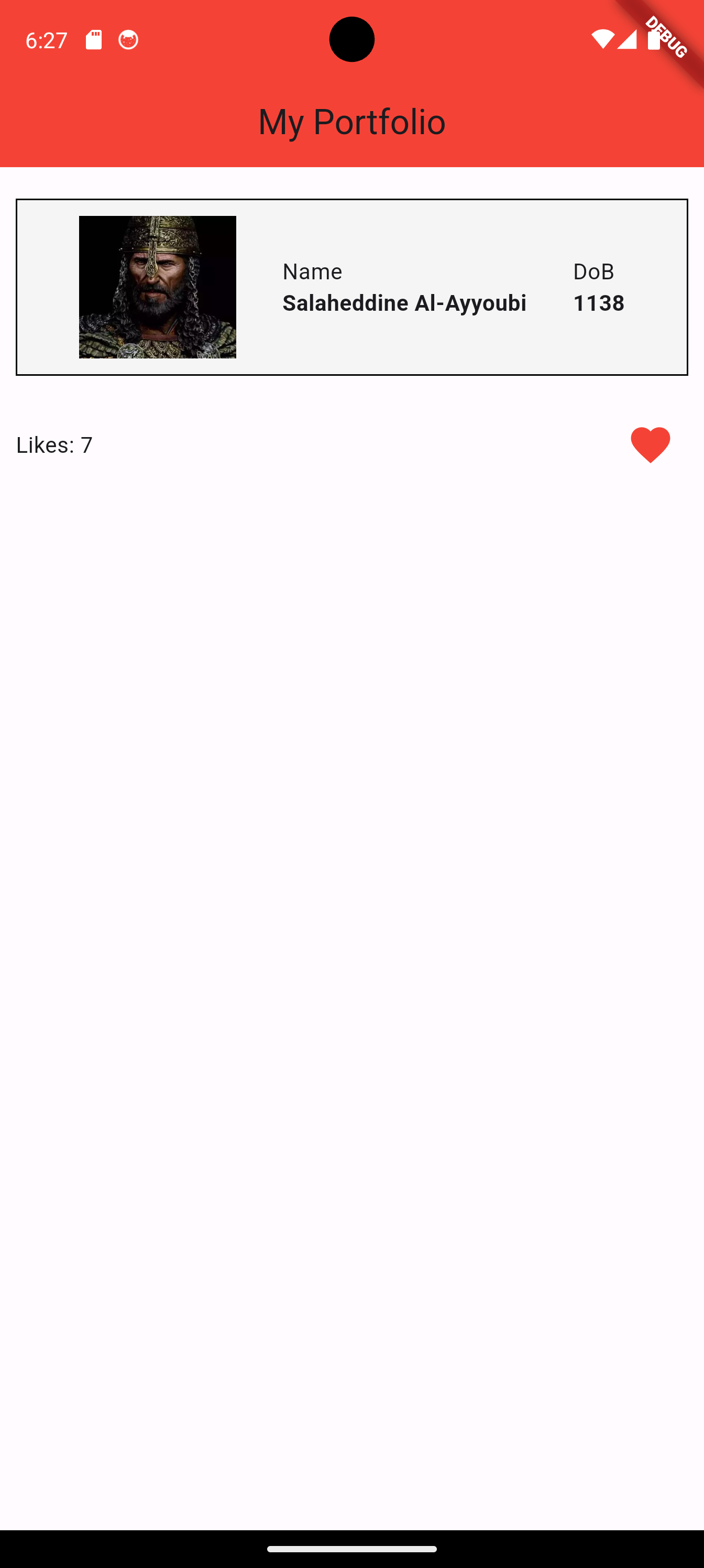
We can use an IconButton instead. We will also remove the dislikes and difference widgets.
    import 'package:flutter/material.dart';

    void main() {
      runApp(MaterialApp(
        home: Home(),
      ));
    }

    class Home extends StatefulWidget {
      @override
      State<Home> createState() => _HomeState();
    }

    class _HomeState extends State<Home> {
      int likes = 0;

      Widget build(BuildContext context) {
        return Scaffold(
            appBar: AppBar(
              title: Text('My Portfolio'),
              backgroundColor: Colors.red,
              centerTitle: true,
            ),
            body: Column(
              children: [
                SizedBox(height: 20),
                Container(
                  decoration: BoxDecoration(
                      border: Border.all(color: Colors.black),
                      color: Colors.grey[100]),
                  padding: EdgeInsets.all(10),
                  margin: EdgeInsets.only(left: 10, right: 10),
                  child: Row(
                    mainAxisAlignment: MainAxisAlignment.spaceEvenly,
                    children: [
                      Image.asset(
                        'lib/assets/images/salah.jpeg',
                        width: 100,
                      ),
                      Column(
                        crossAxisAlignment: CrossAxisAlignment.start,
                        children: [
                          Text('Name'),
                          Text(
                            'Salaheddine Al-Ayyoubi',
                            style: TextStyle(fontWeight: FontWeight.bold),
                          ),
                        ],
                      ),
                      Column(
                        crossAxisAlignment: CrossAxisAlignment.start,
                        children: [
                          Text('DoB'),
                          Text(
                            '1138',
                            style: TextStyle(fontWeight: FontWeight.bold),
                          ),
                        ],
                      ),
                    ],
                  ),
                ),
                SizedBox(height: 20),
                Container(
                  padding: EdgeInsets.only(left: 10, right: 10),
                  child: Row(
                    mainAxisAlignment: MainAxisAlignment.spaceBetween,
                    children: [
                      Text('Likes: $likes'),
                      IconButton(
                        iconSize: 30,
                        icon: const Icon(Icons.favorite),
                        color: Colors.red,
                        onPressed: () {
                          setState(() {
                            likes++;
                          });
                        },
                      )
                    ],
                  ),
                ),
              ],
            ));
      }
} 
1.10 Adding Portfolio Items
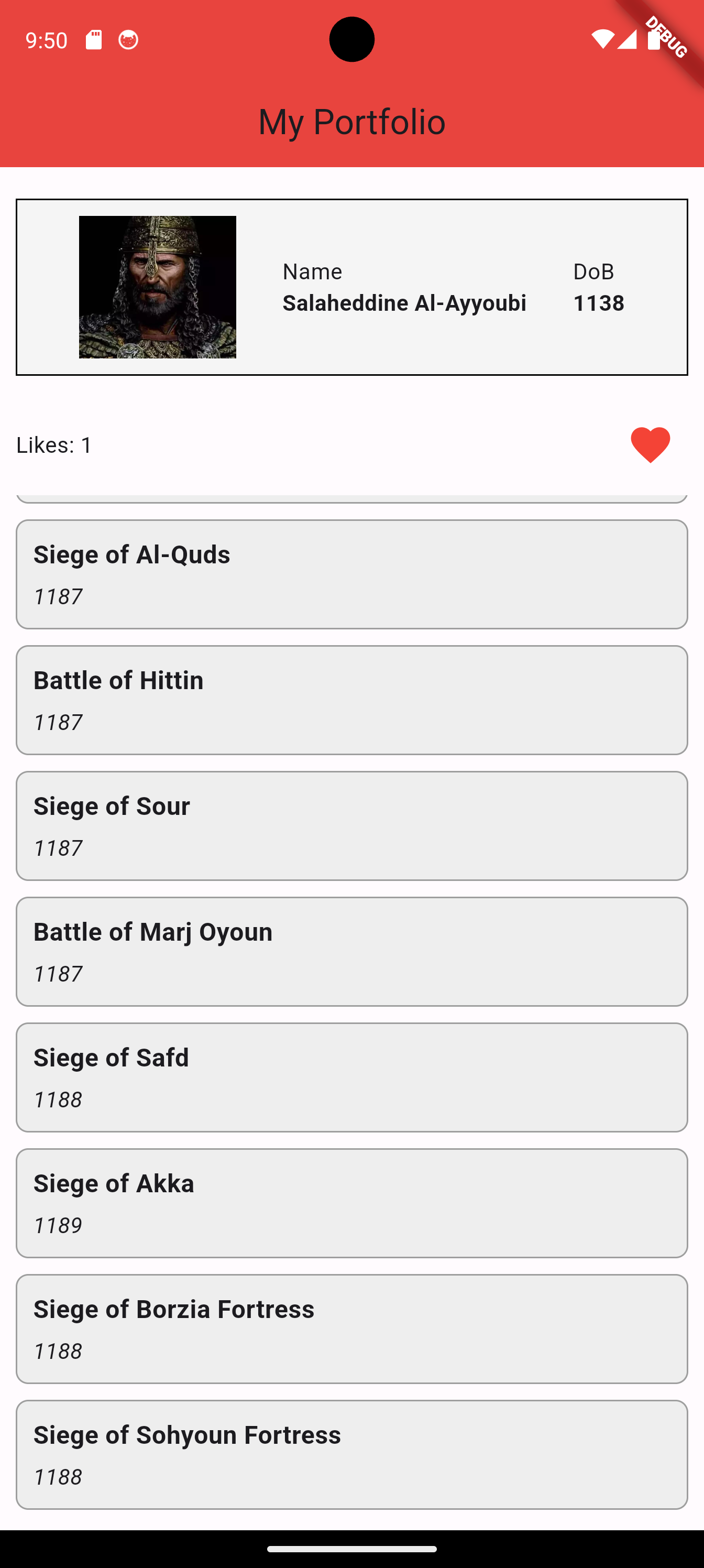
We want to list the projects and achievements of the user. For this, we will gather the achievements in a list, and use ListView.builder() to build the items for us in the widget tree.
First of all, each portfolio item will have a date and a name. Our hero’s achievements are the real deal, they are battle wins. So, we define a class for it. The class in Battle and has two values for the time being. We create a file battle.dart for the class and put it in the same folder as main.dart.
    class Battle
    {
      String? date;
      String? name;

      Battle(String date, String name)
      {
        this.date = date;
        this.name = name;
      }
    }
Now, let’s go back to the file main.dart. It will look as follows.
    import 'package:flutter/material.dart';
    import 'battle.dart';

    void main() {
      runApp(MaterialApp(
        home: Home(),
      ));
    }

    class Home extends StatefulWidget {
      @override
      State<Home> createState() => _HomeState();
    }

    class _HomeState extends State<Home> {
      int likes = 0;

      Widget build(BuildContext context) {
        return Scaffold(
            appBar: AppBar(
              title: Text('My Portfolio'),
              backgroundColor: Colors.red,
              centerTitle: true,
            ),
            body: Column(
              children: [
                SizedBox(height: 20),
                Container(
                  decoration: BoxDecoration(
                      border: Border.all(color: Colors.black),
                      color: Colors.grey[100]),
                  padding: EdgeInsets.all(10),
                  margin: EdgeInsets.only(left: 10, right: 10),
                  child: Row(
                    mainAxisAlignment: MainAxisAlignment.spaceEvenly,
                    children: [
                      Image.asset(
                        'lib/assets/images/salah.jpeg',
                        width: 100,
                      ),
                      Column(
                        crossAxisAlignment: CrossAxisAlignment.start,
                        children: [
                          Text('Name'),
                          Text(
                            'Salaheddine Al-Ayyoubi',
                            style: TextStyle(fontWeight: FontWeight.bold),
                          ),
                        ],
                      ),
                      Column(
                        crossAxisAlignment: CrossAxisAlignment.start,
                        children: [
                          Text('DoB'),
                          Text(
                            '1138',
                            style: TextStyle(fontWeight: FontWeight.bold),
                          ),
                        ],
                      ),
                    ],
                  ),
                ),
                SizedBox(height: 20),
                Container(
                  padding: EdgeInsets.only(left: 10, right: 10),
                  child: Row(
                    mainAxisAlignment: MainAxisAlignment.spaceBetween,
                    children: [
                      Text('Likes: $likes'),
                      IconButton(
                        iconSize: 30,
                        icon: const Icon(Icons.favorite),
                        color: Colors.red,
                        onPressed: () {
                          setState(() {
                            likes++;
                          });
                        },
                      )
                    ],
                  ),
                ),
                // this is the widget responsible for showing the
                // portfolio items
                BattleView(),
              ],
            ));
      }
    }

    // BattleView defines a list of battles and builds a widget tree
    // that lists all the battles
    class BattleView extends StatelessWidget {
      // this is the list of battles
      final List<Battle> battles = [
        Battle('1183', 'Siege of Al-Kark'),
        Battle('1187', 'Siege of Al-Quds'),
        Battle('1187', 'Battle of Hittin'),
        Battle('1187', 'Siege of Sour'),
        Battle('1187', 'Battle of Marj Oyoun'),
        Battle('1188', 'Siege of Safd'),
        Battle('1189', 'Siege of Akka'),
        Battle('1188', 'Siege of Borzia Fortress'),
        Battle('1188', 'Siege of Sohyoun Fortress'),
      ];

    // this builds the widget tree of battles
      @override
     Widget build(BuildContext context) {
        // the root of the widget tree is the widget expanded
        // that will contain all the list items
        return Expanded(
          // a bit of padding
          child: Padding(
            padding: const EdgeInsets.symmetric(vertical: 8.0),
            // this is the actual list builder
            child: ListView.builder(
              // specify the number of items in the list
              itemCount: battles.length,
              // this is the function that returns the widget
              // index will take the values 0 to battles.length-1
              itemBuilder: (context, index) {
                // one item of the list
                final battle = battles[index];
                // is wrapped in a contained
                return Container(
                  // decorations
                  margin: EdgeInsets.symmetric(vertical: 5, horizontal: 10),
                  padding: EdgeInsets.all(10),
                  decoration: BoxDecoration(
                    color: Colors.grey[200],
                    border: Border.all(color: Colors.grey),
                    borderRadius: BorderRadius.circular(8),
                  ),
                  // inside the container, there is a column
                  child: Column(
                    // the column is flushed to the left
                    crossAxisAlignment: CrossAxisAlignment.start,
                    // the column shows the data and name
                    children: [
                      // show name
                      Text(
                        battle.name!,
                        style: TextStyle(fontWeight: FontWeight.bold, fontSize: 16),
                      ),
                      // some vertical space
                      SizedBox(height: 5),
                      // show the date
                      Text(battle.date!, style: TextStyle(fontSize: 14, fontStyle: FontStyle.italic)),
                    ],
                  ),
                );
              },
            ),
          ),
        );
      }
    }
Underneath the container that contains the “likes" items, we add BattleView() which is a widget that we shall define ourselves, and it should return a view of the list of battles that the user has performed in the past.
1.11 Organising Files
Right now, our lib folder looks as follows.
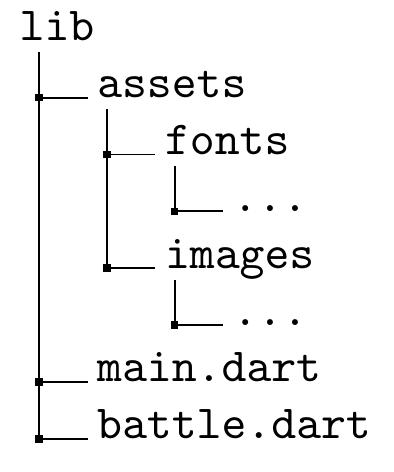
An app should contain many screens or pages, not just one. Therefore, we want to start organising our code to reflect that. Right now, the file main.dart contains the main function together with our home screen. We want to move the home screen to a new file. We also want to add a little bit of folder organisation.
We want to perform the following organisation.
-
Separate the home screen from the main function file.
-
Add folders to group files into categories e.g.
pagesfor pages or screens of the app,widgetsfor any widgets that we build and want to plug in,utilsfor anything we can’t decide where it belongs, etc. -
Create a separate file for the constant data on battles.
The new lib folder should look like:
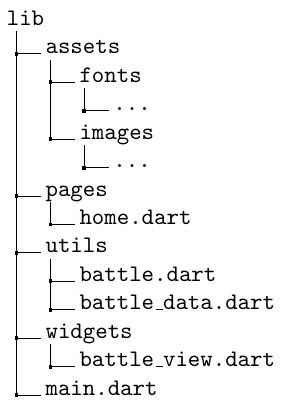
The following are the listings of the new files.
1.11.1 main.dart
    import 'package:flutter/material.dart';
    import 'package:course_app/pages/home.dart';

    void main() {
      runApp(MaterialApp(
        home: Home(),
      ));
    }
1.11.2 home.dart
    import 'package:flutter/material.dart';
    import 'package:course_app/widgets/battle_view.dart';
    import 'package:course_app/utils/battle_data.dart';

    class Home extends StatefulWidget {
      @override
      State<Home> createState() => _HomeState();
    }

    class _HomeState extends State<Home> {
      int likes = 0;

      Widget build(BuildContext context) {
        return Scaffold(
            appBar: AppBar(
              title: Text('My Portfolio'),
              backgroundColor: Colors.red,
              centerTitle: true,
            ),
            body: Column(
              children: [
                SizedBox(height: 20),
                Container(
                  decoration: BoxDecoration(
                      border: Border.all(color: Colors.black),
                      color: Colors.grey[100]),
                  padding: EdgeInsets.all(10),
                  margin: EdgeInsets.only(left: 10, right: 10),
                  child: Row(
                    mainAxisAlignment: MainAxisAlignment.spaceEvenly,
                    children: [
                      Image.asset(
                        'lib/assets/images/salah.jpeg',
                        width: 100,
                      ),
                      Column(
                        crossAxisAlignment: CrossAxisAlignment.start,
                        children: [
                          Text('Name'),
                          Text(
                            'Salaheddine Al-Ayyoubi',
                            style: TextStyle(fontWeight: FontWeight.bold),
                          ),
                        ],
                      ),
                      Column(
                        crossAxisAlignment: CrossAxisAlignment.start,
                        children: [
                          Text('DoB'),
                          Text(
                            '1138',
                            style: TextStyle(fontWeight: FontWeight.bold),
                          ),
                        ],
                      ),
                    ],
                  ),
                ),
                SizedBox(height: 20),
                Container(
                  padding: EdgeInsets.only(left: 10, right: 10),
                  child: Row(
                    mainAxisAlignment: MainAxisAlignment.spaceBetween,
                    children: [
                      Text('Likes: $likes'),
                      IconButton(
                        iconSize: 30,
                        icon: const Icon(Icons.favorite),
                        color: Colors.red,
                        onPressed: () {
                          setState(() {
                            likes++;
                          });
                        },
                      )
                    ],
                  ),
                ),
                // this is the widget responsible for showing the
                // portfolio items
                BattleView(battles),
              ],
            ));
      }
    }
1.11.3 battle_view.dart
    import 'package:flutter/material.dart';
    import 'package:course_app/utils/battle.dart';
    // BattleView defines a list of battles and builds a widget tree
    // that lists all the battles

    class BattleView extends StatelessWidget {
      // this is the list of battles
      final List<Battle> battles;

      BattleView(this.battles);

    // this builds the widget tree of battles
      @override
     Widget build(BuildContext context) {
        // the root of the widget tree is the widget expanded
        // that will contain all the list items
        return Expanded(
          // a bit of padding
          child: Padding(
            padding: const EdgeInsets.symmetric(vertical: 8.0),
            // this is the actual list builder
            child: ListView.builder(
              // specify the number of items in the list
              itemCount: battles.length,
              // this is the function that returns the widget
              // index will take the values 0 to battles.length-1
              itemBuilder: (context, index) {
                // one item of the list
                final battle = battles[index];
                // is wrapped in a contained
                return Container(
                  // decorations
                  margin: EdgeInsets.symmetric(vertical: 5, horizontal: 10),
                  padding: EdgeInsets.all(10),
                  decoration: BoxDecoration(
                    color: Colors.grey[200],
                    border: Border.all(color: Colors.grey),
                    borderRadius: BorderRadius.circular(8),
                  ),
                  // inside the container, there is a column
                  child: Column(
                    // the column is flushed to the left
                    crossAxisAlignment: CrossAxisAlignment.start,
                    // the column shows the data and name
                    children: [
                      // show name
                      Text(
                        battle.name!,
                        style: TextStyle(fontWeight: FontWeight.bold, fontSize: 16),
                      ),
                      // some vertical space
                      SizedBox(height: 5),
                      // show the date
                      Text(battle.date!, style: TextStyle(fontSize: 14, fontStyle: FontStyle.italic)),
                    ],
                  ),
                );
              },
            ),
          ),
        );
      }
    }
1.11.4 battle.dart
    class Battle
    {
      String? date;
      String? name;

      Battle(String date, String name)
      {
        this.date = date;
        this.name = name;
      }
    }
1.11.5 battle_data.dart
    import 'package:course_app/utils/battle.dart';
    final List<Battle> battles = [
        Battle('1183', 'Siege of Al-Kark'),
        Battle('1187', 'Siege of Al-Quds'),
        Battle('1187', 'Battle of Hittin'),
        Battle('1187', 'Siege of Sour'),
        Battle('1187', 'Battle of Marj Oyoun'),
        Battle('1188', 'Siege of Safd'),
        Battle('1189', 'Siege of Akka'),
        Battle('1188', 'Siege of Borzia Fortress'),
        Battle('1188', 'Siege of Sohyoun Fortress'),
      ];