
1 Project Description
This project aims to develop a comprehensive Learning Management System (LMS) Android application for managing and accessing courses in the computer science department. The application will provide an interactive platform for students and faculty, delivering course information, content browsing, quizzes, and performance tracking—all through a user-friendly Flutter interface.
2 Project Requirements
The following is a list of requirements to be implemented in the LMS application.
2.1 User and Profile Management
-
[R01] User Registration and Login: Implement sign-up and login options.
-
[R02] Profile Management: Allow users to personalize profiles with details such as name, email, and profile picture.
-
[R03] Role-Based Access Control: Implement role-based permissions for students, faculty, and admins.
2.2 Course Management
-
[R04] Course Browsing and Search: Enable users to search for courses by name, code, tags, and academic level.
-
[R05] Course Details: Display detailed course information, including syllabus, prerequisites, credits, and instructor bio.
-
[R06] Course Structure: Organize course content into parts, chapters, and topics for structured navigation.
-
[R07] Content Viewing: Support PDF and video content within the app for course materials.
-
[R08] Favorites and Bookmarks: Allow users to bookmark specific resources or topics for quick access.
2.3 Assessment and Tracking
-
[R09] Quiz Module: Create multiple-choice and true/false quizzes to assess student knowledge.
-
[R10] Progress Tracking: Allow users to track progress within the elements in the course and view element completion.
-
[R11] Grading System: Provide immediate feedback for quizzes.
2.4 User Experience Enhancements
-
[R12] User Dashboard: Provide an overview of course progress, including completion rates and time spent on course elements.
-
[R13] Admin and Instructor Panel: Develop an interface for admins and instructors to manage course content, view analytics, and track student engagement.
3 Requirement Classes
To facilitate a phased approach to development, the requirements are categorized into three classes based on difficulty: Basic, Intermediate, and Advanced.
3.1 Basic Requirements
These requirements are foundational and provide the core functionality of the LMS application:
-
[R01] User Registration and Login
-
[R02] Profile Management
-
[R04] Course Browsing and Search
-
[R05] Course Details
-
[R06] Course Structure
-
[R07] Content Viewing
3.2 Intermediate Requirements
These requirements expand functionality and improve the user experience by adding interactive elements:
-
[R03] Role-Based Access Control
-
[R08] Favorites and Bookmarks
-
[R10] Progress Tracking
-
[R12] User Dashboard
3.3 Advanced Requirements
These requirements add complexity to the app, making it highly interactive and feature-rich:
-
[R09] Quiz Module
-
[R11] Grading System
-
[R13] Admin and Instructor Panel
4 Deliverables
You should submit your application files including the Flutter code, the rest API, and the MySQL database. In addition to this, you will also submit a report.
4.1 Application Files
Create a folder named StudentNumber_StudentName_DM_FP. For example, if your student number is 202138187709 and your name is Mohammed Ali, the folder’s name should be 202138187709_MohammedAli_DM_FP.
Inside this folder create three folders.
-
A folder named
Flutter. -
A folder named
PHP, if you use a MySQL database. -
A folder named:
-
MySQL, if you use a MySQL database. -
SQLite, if you use a local database.
-
4.1.1 Flutter App
-
You should name your project
dm_final_project. You should put all your files, including the assets inside thelibfolder. -
Make sure your code is commented adequately. At the top of each class and function, include a summary (in comments) that explains the role of the class or function.
-
If you use REST API, the address of
localhostthat you use during development e.g.192.168.1.2should be stored inside a variable, so that it can be updated easily during project evaluation. -
Inside the folder
Flutterwe created before, copy yourlibfolder andpubspec.yamlfile.
4.1.2 PHP API
-
Use the following configuration for your API.
<?php // config.php $host = 'localhost'; $db = 'dm_final_project'; $user = 'student'; $password = '$tr0ngP4$$w0rd'; // [$ is the Dollar sign, not S], [0 is the digit zero, not the letter O] // ... ?> -
Inside the
htdocsfolder within the XAMPP installation directory (e.g.,C:xampp_htdocs, create a folder namedm_final_project. -
Place the all the (PHP) API files in this folder.
-
Copy the folder
dm_final_projectto the folderPHPthat you created previously
4.1.3 MySQL Database
If you use a MySQL database:
-
The database must be called
dm_final_project. -
Export the database, and put it inside the folder
MySQLthat you created previously. -
In addition to exporting the database, provide a file
dm_final_project.txtthat contains all the SQL commands needed to create and/or populate the database. For example, the following shows the code required to create a table calledbattlesand populate it with data. You have to include this for all your tables. This is a backup plan in case importing your database triggers an error.CREATE TABLE `battles` ( `id` INTEGER, `name` TEXT, `date` TEXT, `summary` TEXT, PRIMARY KEY(`id`) ); INSERT INTO battles (id, name, date, summary) VALUES ('1', 'Siege of Al-Kerak', '1183', 'Summary of Siege of Al-Quds'), ('2', 'Siege of Al-Quds', '1187', 'Summary of Siege of Al-Quds');
4.1.4 SQLite Database
If you use local storage:
-
The database must be called
dm_final_project. -
Export the database, and put it inside the folder
SQLitethat you created previously. -
In addition to exporting the database, provide a file
dm_final_project.txtthat contains all the SQL commands needed to create and/or populate the database. For example, the following shows the code required to create a table calledbattlesand populate it with data. You have to include this for all your tables. This is a backup plan in case importing your database triggers an error.CREATE TABLE `battles` ( `id` INTEGER, `name` TEXT, `date` TEXT, `summary` TEXT, PRIMARY KEY(`id`) ); INSERT INTO battles (id, name, date, summary) VALUES ('1', 'Siege of Al-Kerak', '1183', 'Summary of Siege of Al-Quds'), ('2', 'Siege of Al-Quds', '1187', 'Summary of Siege of Al-Quds');
You should now have the following folder structure.
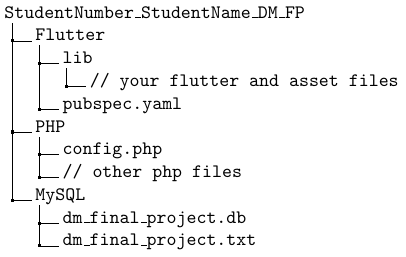
or:
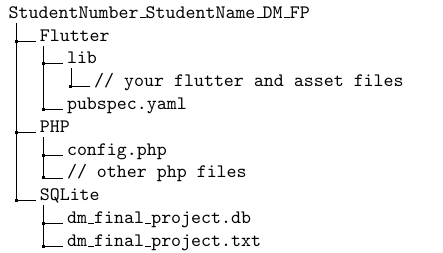
Now archive the folder StudentNumber_StudentName_DM_FP.
The archive name should be StudentNumber_StudentName_DM_FP.zip.
4.2 The Report
The report should be written in your favourite word processor e.g. Microsoft Word. The report should cover the following items.
-
The role of each class in your Flutter code in terms of App functionality.
-
For each requirement, explain which classes are involved, and how they interact with each other to provide the functionality.
-
Describe the tables in your database, and what kind of information they store.
Convert your report file to PDF and name it StudentNumber_StudentName_DM_FP.pdf.
5 Submission
Your work i.e. the two files StudentNumber_StudentName_DM_FP.zip and StudentNumber_StudentName_DM_FP.pdf should be submitted twice as follows.
-
Via Moodle through the course webpage. In this case, upload the
.zipand.pdffiles using the provided assignment upload link. -
To the course instructor as physical copies. The
.zipfile should be burnt on optical media (CD/DVD), and the report should be printed. Make sure to put your name on the optical media.
6 Evaluation
The project mark is based on the application mark, the report, and the presentation mark.
6.1 Application Evaluation
The application is marked is distributed as follows.
-
Using
MySQL. -
Using
SQLite.
6.2 Report Evaluation
The report is evaluated against the criteria set previously i.e. explanation of classes in the system, explanation of how the classes implement the requirements, and explanation of the database.
Very low details as well as shallow description will make you lose marks. Therefore, make sure you explain concisely but adequately.
6.3 Presentation Evaluation
You will undergo an oral examination to verify the authenticity of your work.
6.4 Overall Mark
A combination of the application, report, and presentation evaluation will determine the total mark for the final project.