
1 Objective
Obtain hands-on experience using Microsoft Word.
2 Assignment
Consider the following text.
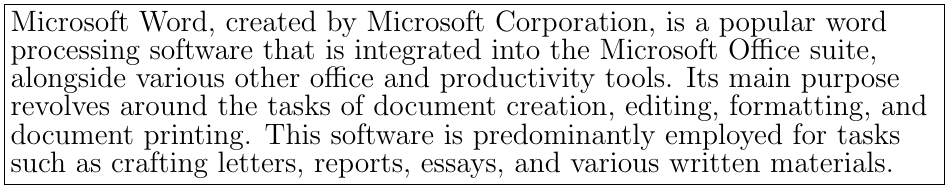
-
Type the paragraph above as is, using the “Verdana" font, with size 12.
-
Change the font type to “Arial” and size to 14.
-
Right-align your paragraph.
-
Justify your paragraph (both left and right).
-
Save this file as “BW-Practical-01-Text.docx" in the “My Documents” folder.
-
Change the style of two words to “Italic", change the style of two other words to “Bold", “Underline" two other words, “Strike-through" two other words, and change the style of two other words to both “Italic" and “Bold".
-
Close the file.
-
Open this file again using the “Open" option of Word.
-
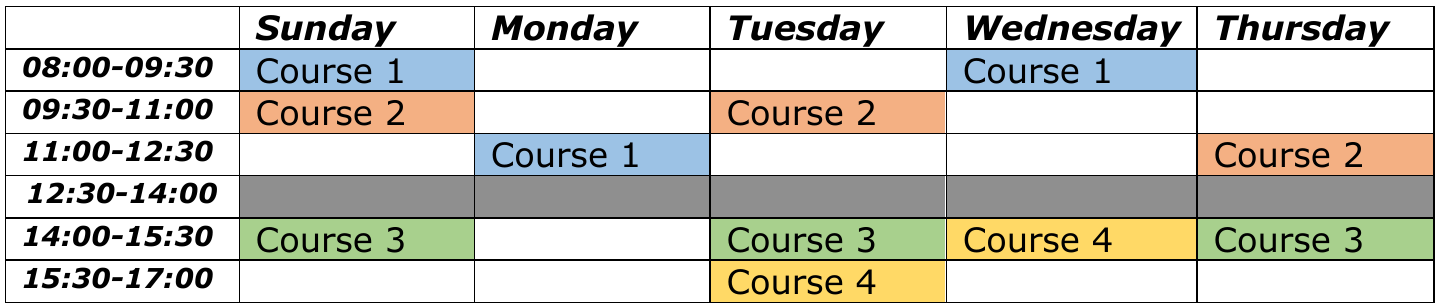
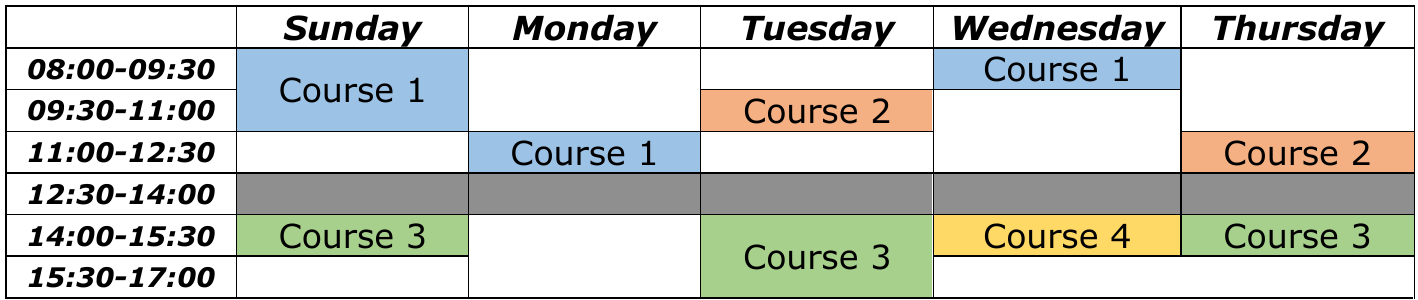
Create the following two tables.
Last modified: Thursday, 28 November 2024, 6:52 PM