
As one of the key disciplines in today’s world, computer science (or informatics in some places) deals with the concept of computation in its widest interpretation. This encompasses any form of information that can be expressed numerically, including text, media (images, audios, videos), biological data, medical data, traffic, finance, climate, social media, etc.
This chapter introduces several fundamental concepts to help you begin your journey in the course “Algorithms and Data Structures".
1 Computer Science
Computer science refers to the study of how information can be processed by machines automatically.
-
Information: Anything a machine is capable of handling or manipulating, including text, media, etc. This can further be classified into data and instructions.
-
Processing: This refers to the series of commands or operations a machine follows to complete tasks.
-
Machine: The device responsible for executing these commands, such as computers, phones, game consoles, smart appliances, etc
2 History of Computer Science
2.1 Ancient Beginnings
Early computational tools like the abacus (circa 2400 BCE) and mathematical frameworks developed by ancient Egyptians, Greeks, and Indians laid the groundwork for structured problem-solving.
2.2 Mechanical Computers
-
In the 17th century, Blaise Pascal developed the Pascaline, a mechanical calculator.
-
Gottfried Wilhelm Leibniz enhanced it with the Step Reckoner.
-
In the 19th century, Charles Babbage designed the Analytical Engine, considered the precursor to modern computers, with Ada Lovelace creating what is often regarded as the first algorithm intended for a machine.
2.3 Formal Foundations
In the early 20th century, theoretical work by Alan Turing, Alonzo Church, and Kurt Gödel explored the limits of computation, leading to the development of the Turing Machine concept, the basis of modern algorithms and computer science.
2.4 Electronic Computers
-
The 1940s marked the creation of the first programmable digital computers, such as the ENIAC and Colossus.
-
The invention of the transistor in 1947 by Bardeen, Brattain, and Shockley revolutionized computer design, enabling smaller, more efficient devices.
2.5 Software Development
-
The 1950s and 60s saw the emergence of high-level programming languages like FORTRAN, COBOL, and LISP.
-
The development of operating systems in the 1960s provided multitasking capabilities and simplified hardware interaction.
2.6 Personal Computing Revolution
In the 1970s and 80s, computers transitioned from institutions to homes with the advent of personal computers like the Apple II, Commodore 64, and IBM PC. This era also saw the rise of graphical user interfaces (GUIs).
2.7 The Internet Era
The late 20th century witnessed the birth and popularization of the World Wide Web (1990, Tim Berners-Lee), transforming how information is accessed and shared globally.
2.8 Modern Advances
The 21st century brought advances in AI, machine learning, cloud computing, and quantum computing, reshaping industries and daily life.
3 Computers, Structure, and Functionality
A computer is an electronic device designed to receive, process, store, and output data based on a set of instructions, typically in the form of a program. It can perform a wide variety of tasks by executing different software applications. Computers range from small devices like smartphones and embedded systems to large supercomputers that perform complex tasks in scientific research and industry. At its core, a computer operates by:
-
Inputting data: Receiving data from various input devices like a keyboard, mouse, camera, scanner, sensors, etc.
-
Processing data: Using the central processing unit (CPU) to perform calculations, and generally process the data received in the previous stage.
-
Storing data: Temporarily or permanently saving information in memory or storage devices like main memory, HDDs, SSDs, etc.
-
Outputting data: Sending the processed information to output devices such as a monitor, printer, speakers, other networked computers, etc.
This course is mostly concerned with the data processing stage. The data must be represented internally, or structured in a way that is suitable for processing. This is the “data structures" part of the course title. Once data has been structured, we operate on it using “algorithms".
The following figure shows common input/output devices.
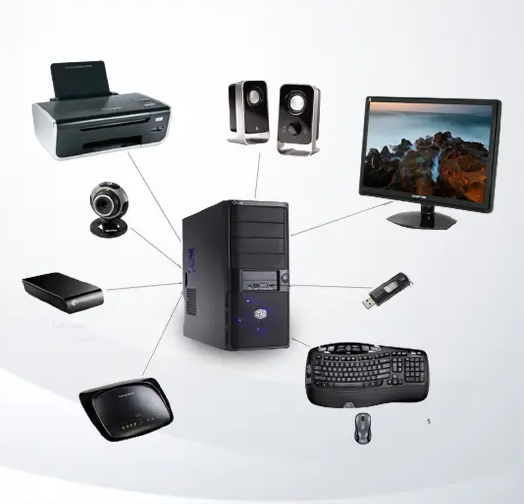

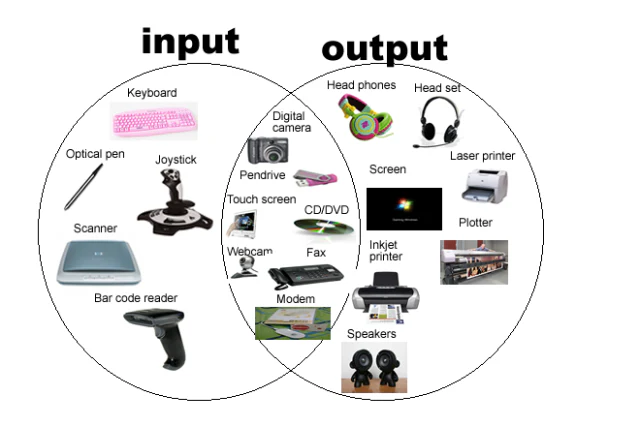

The following figures show the internals of a desktop computer. The processor is a chip mounted on the motherboard.

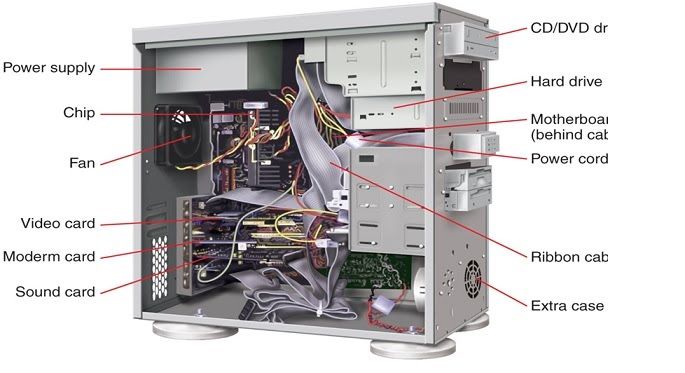
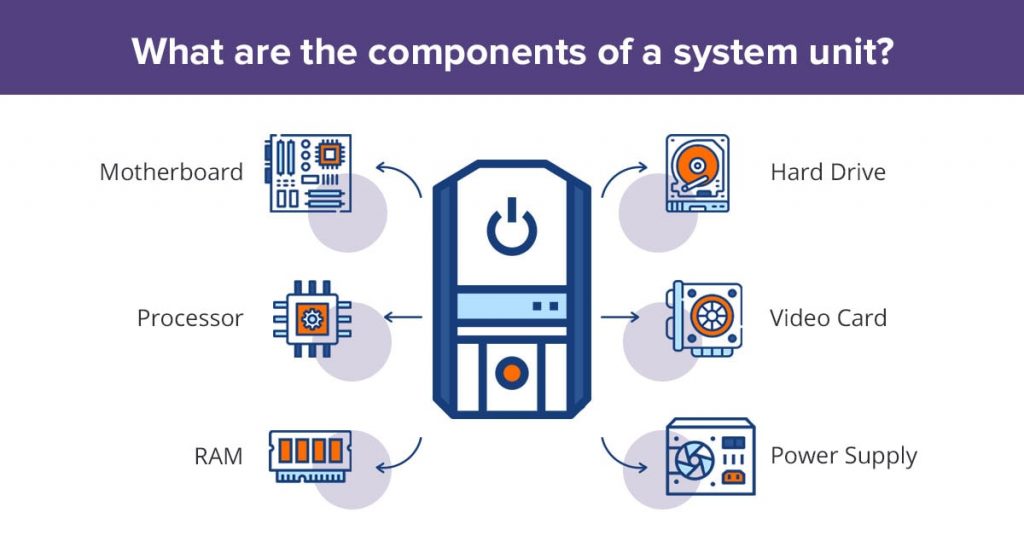

4 Hardware and Software
4.1 Hardware
Hardware refers to the physical components of a computer that you can see and touch. It includes all the tangible elements required for the computer to function.
4.1.1 Examples of Hardware
-
Input Devices: Keyboard, mouse, scanner, microphone.
-
Output Devices: Monitor, printer, speakers.
-
Storage Devices: Hard drives (HDDs), solid-state drives (SSDs), USB drives.
-
Processing Units: Central Processing Unit (CPU), Graphics Processing Unit (GPU).
-
Motherboard: The main circuit board connecting all components.
-
Memory: RAM (Random Access Memory), ROM (Read-Only Memory).
4.1.2 Types of Hardware
-
Internal Hardware: Components inside the computer, such as the CPU, RAM, and motherboard.
-
External Hardware: Devices attached to the computer, such as a mouse, keyboard, or monitor.
4.1.3 Key Hardware Component: CPU
The CPU (Central Processing Unit) is often referred to as the brain of the computer. It performs calculations and executes instructions. Key Functions:
-
Fetch: Retrieve instructions from memory.
-
Decode: Interpret what the instructions mean.
-
Execute: Perform the specified operation.
4.2 Software
Software refers to the intangible instructions and data that tell hardware what to do. Unlike hardware, software cannot be physically touched.
4.2.1 Types of Software
-
System Software:
-
Operating Systems (OS): Manages hardware and software resources (e.g., Windows, Linux, macOS).
-
Utility Programs: Perform maintenance tasks (e.g., antivirus software, disk cleanup tools).
-
-
Application Software: Programs designed for end-users (e.g., word processors, web browsers, games).
-
Programming Software: Tools for developers (e.g., compilers, code editors).
4.2.2 Key Software Component: Operating System
The Operating System (OS) is the software that acts as a bridge between hardware and application software. Key Functions:
-
Manages hardware resources.
-
Provides a user interface (e.g., graphical or command-line).
-
Handles file management and system security.
4.3 Interaction Between Hardware and Software
Hardware and software work together to perform tasks. Example:
-
A user types on a keyboard (hardware).
-
The operating system (software) processes the input and displays the text on the screen (hardware).
4.3.1 Real-World Analogy
Think of hardware as the body of a car (engine, tires, etc.) and software as the driver. Without the driver, the car cannot function, and without the car, the driver cannot move.
4.3.2 Common Examples of Hardware-Software Pairs
-
Hardware: Printer | Software: Printer drivers.
-
Hardware: Webcam | Software: Video conferencing app.
-
Hardware: GPU | Software: Graphics rendering engine.
5 Programming Languages
Programming languages are the tools used to create software and communicate instructions to a computer. They act as a bridge between human-readable instructions and the machine-readable binary code.
5.1 Language
Language serves as a tool for communication and understanding among humans. For computers, it is the method through which they interpret human commands.
5.2 Programming Language
A programming language provides a framework for creating algorithms and developing programs that can be executed by a computer. It allows us to describe the data structures to be manipulated and the operations to be performed.
Acting as a bridge between human and machine language, programming languages are understandable to humans while being translatable into the binary code that computers understand.
There are many programming languages, each with its own set of rules and benefits, making them more suitable for specific software types. Programmers need to be familiar with these languages and know which one is best suited for a given application.
5.3 Types of Programming Languages
-
Low-Level Languages:
-
Machine Language: Binary code directly understood by the computer (e.g., ‘010101‘).
-
Assembly Language: Symbolic representation of machine code using mnemonics like ‘MOV‘, ‘ADD‘.
-
-
High-Level Languages:
-
Easy to read and write, closer to human language.
-
Examples: C, Python, Java, JavaScript.
-
5.4 Why Learn Programming?
-
To create applications, automate tasks, and solve complex problems.
-
To develop skills for in-demand careers in software development, data analysis, AI, and more.
5.5 Common Programming Languages and Their Uses
-
C: System programming, embedded systems.
-
Python: Data analysis, machine learning, web development.
-
Java: Mobile app development, enterprise systems.
-
JavaScript: Web development, interactive websites.
-
SQL: Database management.
6 Programs
Imagine your computer as a factory. The factory has different workers (input/output devices), storage areas (like warehouses), and a central team leader who oversees everything – this is your processor (CPU). When you write a program, think of it as a set of instructions, like a recipe or a task list, that tells the factory workers what to do.
Now, who carries out these instructions? It’s the processor, the central brain of your computer. Every time you run a program – whether it’s a simple calculator app or a complex video game – the program is sent to the processor. The processor interprets and executes each instruction step by step.
But as the processor runs these instructions, it needs a place to keep data temporarily, like raw materials a worker might store close by while working on an assembly line. That’s where memory (RAM) comes in. Programs store data in memory so the processor can access and modify it quickly. For example, if you’re working on a text document, every time you type, the processor stores your changes in memory so it can keep track of what you’ve written.
Think of memory as a short-term workspace for the processor. When you close the program, the final product (your text, for instance) gets saved to long-term storage (like your hard drive), much like finished goods are moved from the assembly line to a warehouse for safekeeping.
So, when you run a program, here’s what happens:
-
Input devices (like your keyboard or mouse) send information to the processor.
-
The processor reads the program’s instructions and begins executing them, step by step.
-
As the processor works, it stores and retrieves data from memory to keep everything running smoothly.
-
Once the task is done, any final results can be displayed through output devices or saved to storage for future use
In this way, every program relies on the processor to bring its instructions to life, using memory as its workspace to manage and manipulate the data it needs.
A program is written in a specific machine language. However, before writing a program in a specific language such as C for example, we need to formulate it abstractly – this is called an “algorithm".
7 Development Tools
Programming is the task of writing programs, however, writing programs is only part of the story that will call development which includes requirement analysis, programming or coding, testing, deploying, testing, making patches and updates, etc. In order to survive with the complex development tasks, there are tools that a developer use.
7.1 Compiler
A compiler is a computer program that transforms source code written in a specific programming language into machine code that can be executed directly by the computer.
7.2 Integrated Development Environment (IDE)
While it is possible to write a program using a basic text editor like Notepad on Windows, this approach makes development challenging for anything other than trivial programs. To streamline the process, developers use an Integrated Development Environment (IDE), which provides a suite of tools for the entire development lifecycle. IDEs facilitate design, development, testing, debugging, and deployment, making programming more efficient and faster. The IDE needs to be linked to a compiler to perform syntax checks, debugging, and compilation.
7.3 Versioning Systems
These are helpful to keep track of the different versions of code written by one or more developers.
8 From Problems to Applications
So what is the relationship between algorithms and the computer applications that we use everyday?
An algorithm is a mathematical or a pseudo-mathematical description of a solution to a problem. We need to write this solution using a programming language to obtain a computer program, program code, or simply code. The code is – then with the help of a compiler – is turned into an executable (binary) file, which what we refer to as “application", “app", “software", etc. Therefore, in order to develop an application, we proceed with the following steps (see also Figure 1.5).
-
Problem Definition: We need to understand very well the problem for which we want to write an algorithm, or write a program. We must understand the input to the problem, the desired or expected output, and any further characteristics such as timing and performance constraints.
-
Algorithm Design: We find the solution to the problem in the form of a precise sequence of steps expressed in the form of pseudo code. A pseudo code describes the algorithm “on paper" but cannot be fed to a computer.
-
Program: We transform the algorithm (pseudo code) into code written in a given programming language. There are hundreds of programming languages around but only few of them are widely used. The most prominent programming languages include C, C#, C++, Java, Kotlin, Dart, Javascript, PHP, Python, etc. In this course, we use C.
-
Application: Using a compiler (or interpreter in some cases), we transform the human-written code to a machine-generated code that can be executed by the machine.
8.1 Deriving an Algorithm to a Problem
Finding an algorithm to solve a problem involves a systematic approach, where you break down the problem and develop a step-by-step solution. Here’s a general method to follow:
-
Understand the Problem
-
Clarify the input: Identify what data or information the problem provides. What do you start with?
-
Clarify the output: Determine what the expected outcome is. What is the solution supposed to deliver?
-
Constraints: Are there any limitations, such as time, space, or specific rules that the solution must adhere to?
-
-
Break the Problem into Smaller Parts Decompose the task into smaller subtasks that can be solved independently. Think about each step needed to move from the input to the output.
-
Write a Step-by-Step Procedure Outline the series of actions the algorithm will follow to reach the output. Make sure the steps are simple and executable.
-
Test and Validate Once you have a solution, test it with different inputs (including edge or pathological cases) to ensure it works as expected. Think of different scenarios that might break your algorithm, like an empty list or all identical numbers.
-
Optimize (If Needed) After finding a working algorithm, think about whether you can make it more efficient (in terms of time or space). Could you reduce the number of steps? Use less memory?
8.2 Example
Problem: Find the second-largest number in a list of numbers.
-
Understand the Problem:
-
Input: A list of numbers (e.g., [5, 8, 3, 12, 7]).
-
Output: The second-largest number (i.e., 8).
-
-
Break the Problem into Steps:
-
Find the largest number.
-
Remove or ignore the largest.
-
Find the largest number from the remaining ones.
-
-
Choose a Strategy: A simple strategy would be to loop through the list twice: once to find the largest and once to find the second-largest.
-
Write the Algorithm:
-
Create two variables: largest and second_largest.
-
Loop through the list, updating largest as needed.
-
Loop through the list again, this time ignoring largest and finding the next largest number.
-
Return second_largest.
-
-
Test:
-
Input: [5, 8, 3, 12, 7] → Output: 8
-
Input: [2, 2, 2, 2] → Output: There’s no distinct second-largest number.
-
Input: [] → Output: ???
-